Welcome to Funnel Engine
An introduction to the premium visual drag-and-drop SaaS website and funnel builder.
Prerequisites
- •A registered account on the platform.
- •Verified subscription plan or free tier activation.
What You'll Learn
- Digital entrepreneurs building product launch checkouts.
- Lead generation agencies capturing client information on custom paths.
- SaaS teams constructing multi-stage upsell workflows.
Overview
Funnel Engine is an enterprise-grade SaaS platform designed to build high-performance visual landing pages, sales funnels, and corporate websites. It integrates code-free editing canvas, custom form configuration, visual node automation, and custom domain mapping to enable businesses to create, publish, and track online assets without technical bottlenecks.
Why Use It
Traditional marketing suites are slow and separate. Funnel Engine unifies visual builder, CRM, forms, pixel analytics, custom domains, payment processors, and visual automated workflows into one secure dashboard.
Prerequisites
Step-by-Step Setup Guide
Register for an account using Google OAuth or email and password credentials.
Log into the dashboard to view your workspaces.
Click "Create Site" to initiate the step-by-step onboarding wizard.
Define whether you want a visual Website or a linear conversion Funnel.
Choose your business category to load specialized prompt structures and layout templates.
Screenshots & Visual Placements
Screenshot placeholders are organized as static assets. Take a screenshot matching the parameters below to populate visual content.
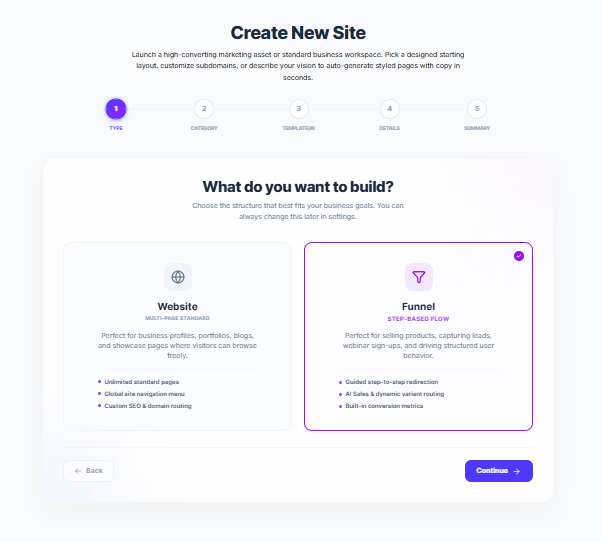
Onboarding Wizard landing page
Addedonboarding-wizard-step1.pngPractical Business Example
First Onboarding Run
A service agency launching a lead capture flow.
Select "Funnel" in Step 1 of the wizard.
Choose "Lead Generation" from the category list.
Choose "Describe to AI" and type "Modern consulting agency offering free strategy audits."
Click Generate to create the pages.
Best Practices & Gotchas
Choose categories closely aligned with your goal to load custom step routes.
Workspace limitations apply according to active plan limits.
Banned users or accounts with inactive invoices are blocked from using workspace editors.
Skipping category selections which loads basic layouts instead of tailored templates.
Troubleshooting
Unable to login via email and password.
Verify email spellings and use the forgot password flow to reset JWT credentials.
Frequently Asked Questions
Related Articles
📋 Documentation Accuracy Policy — This content reflects the current production implementation of Funnel Engine. Features, workflows, and UI behavior are verified against the live codebase. No unfinished or speculative features are documented.